First Impressions: Surprisingly Smooth
From the outset, Wispr Flow feels lightweight and easy to get going with.
Setup is straightforward on Windows, and while iPhone requires a couple of tweaks (mainly around keyboard permissions and microphone access), it's nothing complex—just the usual iOS steps. Once that's done, it works reliably.
What stood out immediately:
- Fast transcription
- Minimal lag
- Very little friction to start using it regularly
There was the odd typo—but in fairness, it was on an unusual word, so nothing unexpected. For the most part, accuracy has been solid.
The Real Value: It Changes Behaviour
The biggest impact hasn't just been speed—it's been removing resistance.
There are messages you should send but don't, simply because typing them feels like effort. That friction disappears when you can just speak.
I've actually found myself sending messages I would normally put off, simply because I can say them instead of typing them. That alone has made a noticeable difference to how quickly things get done.
Real Performance Gains (With Numbers)
This is where things get interesting.
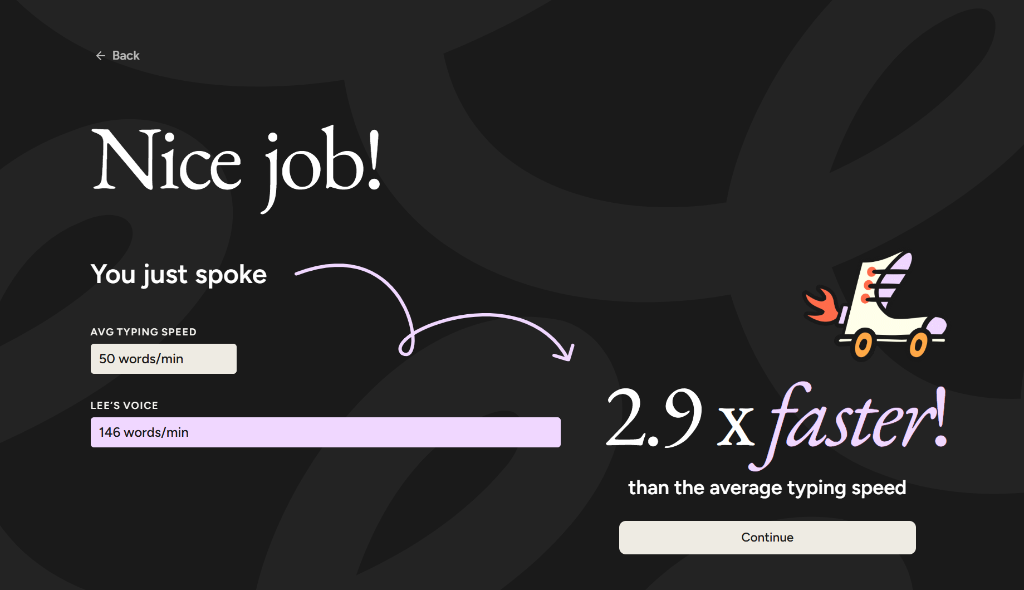
- My average typing speed: 50 words per minute
- Wispr Flow dictation speed: 146 words per minute
That's nearly 3x faster.
When you apply that to a typical working week:
- Approx. 4 hours per day spent typing
- That equates to roughly 18 hours per week saved
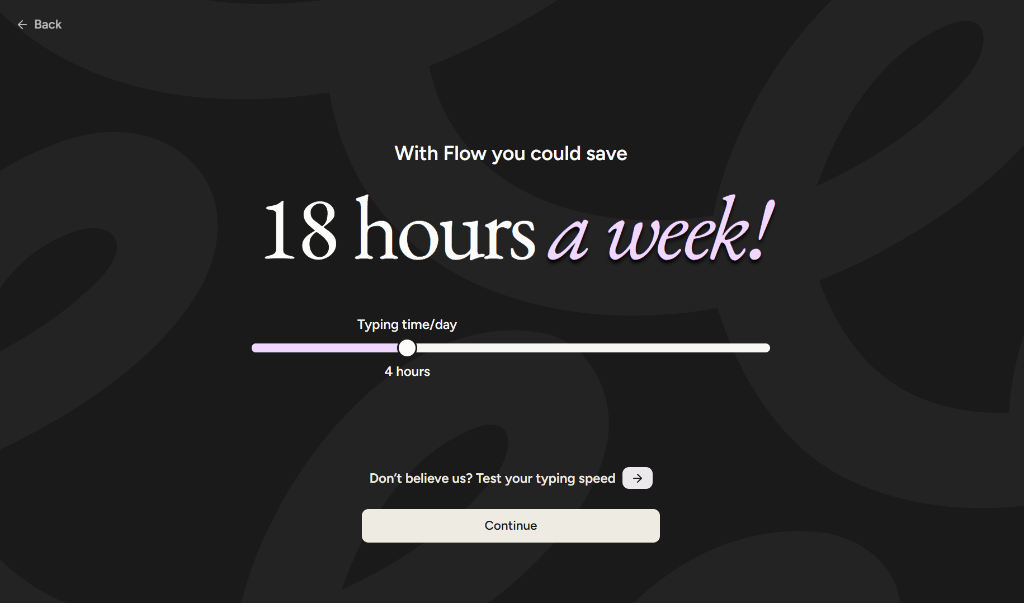
Even if the real-world saving is slightly less, it's still a significant amount of time back.
Real Examples of How I'm Using It
Example 1: Sending messages I'd normally delay
Instead of opening my laptop and typing out a message, I can dictate something like: Hi, just wanted to check in on where we are with this. Are you happy for us to proceed, or do you need anything further from me?
Previously, that might sit on my to-do list longer than it should. Now it gets sent immediately.
Example 2: Working while walking
While out walking the dog, I've been able to send prompts directly into tools like ChatGPT, such as: Create a short blog outline for small businesses looking to get started with AI, keep it practical and non-technical.
By the time I'm back, I've already got something to work from.
Example 3: Quick idea capture
Instead of noting things down later (and sometimes forgetting), I just speak them as they come to mind. It's a much more natural way to capture ideas.
Productivity on the Move
One unexpected benefit is how well this works when you're not at your desk.
Being able to dictate messages, prompts, and ideas while walking adds a new layer of productivity. It turns otherwise unused time into something useful.
That said, there's a balance — sometimes it's still worth just enjoying the fresh air.
Key Features (and What They Actually Mean in Practice)
Voice-to-text dictation — Fast and accurate. Works well for everyday communication and content creation.
Real-time transcription — Very little delay, which makes it usable in live workflows rather than feeling clunky.
Cross-platform support — Works across Windows and iPhone with a consistent experience once set up.
Smart formatting and natural language handling — Understands conversational input fairly well, though not perfect in every case.
Mobile keyboard integration — Works as part of your keyboard on iPhone, but does require a couple of initial settings tweaks.
Where It Could Improve
- iPhone setup could be a bit clearer, especially around permissions
- Occasional inaccuracies on less common words
- Would benefit from custom vocabulary or learning over time
- More control over formatting could be useful for structured outputs
None of these are major issues, but they're worth noting.
Who This Is Best For
- Small business owners who are short on time
- People who procrastinate on writing messages or emails
- Anyone who spends a large part of their day typing
- People who are often on the move but still want to stay productive
Final Thoughts
Wispr Flow isn't trying to be revolutionary — but it ends up being quietly transformative.
It removes friction, speeds things up, and most importantly, changes behaviour.
If a tool helps you actually do the things you've been putting off — and gives you back a meaningful chunk of time each week — that's a strong result.
Want to Find More Time-Saving Tools Like This?
If you're curious about how tools like this could fit into your business and save you time day-to-day, take a look at what we're doing at AI for Small Businesses.
Or, if you just want to explore where AI could make the biggest difference for you, try our AI Scorecard and get a personalised view of where you could save time and improve efficiency.